
The Data Lineage module in Governata is one of the core modules that enables tracking the path of data within the organization from source to final use.
This module enables users to understand how data moves between different systems and what operations are performed on it, helping enhance data transparency and trust.
This module helps to:
- Track data sources
- Understand data flow between systems
- Know the operations and transformations performed on data
- Analyze the impact of changes on data (Impact Analysis)
- Support data governance and quality
The Data Lineage module aims to enable users to trace the data journey within the organization in a clear and integrated manner.
This helps to:
- Understand the origin of data before using it
- Analyze the impact of any change on related data
- Support decision-making based on reliable data
- Enhance transparency in data flow
This manual covers how to use the Data Lineage module within Governata, including:
- Accessing Data Lineage
- Browsing the data path
- Analyzing data flow between systems
- Understanding operations performed on data
Data Lineage
The path that data takes from its original source until it is used in reports or systems.
Data Source
The system or database from which data is extracted.
Transformations
Operations performed on data such as cleaning, merging, or calculation.
Impact Analysis
The process of identifying the effect of a change in a data element on related elements.
5. Roles and ResponsibilitiesSeveral roles within the organization share responsibility for using and analyzing data lineage.
Roles include:
Data Analysts
Use data lineage to understand the source of data before using it.
Data Engineers
Analyze data flow and transformations between systems.
Data Stewards
Verify data accuracy and trace its source.
Governance Teams
Use data lineage to ensure compliance and understand data flow within the organization.
6. Target AudienceThis module targets users who work with data analysis and understand its flow, such as:
- Data Analysts
- Data Engineers
- Data Stewards
- Governance Teams
To access Data Lineage quickly:
- Navigate to Data Lineage from the side menu.
- Search for the required data element.
- Open the element details.
- Navigate to the Data Lineage tab.
The Data Lineage interface displays a visual representation of the data path between different systems.
As shown in Figure (1).
[Figure (1)]
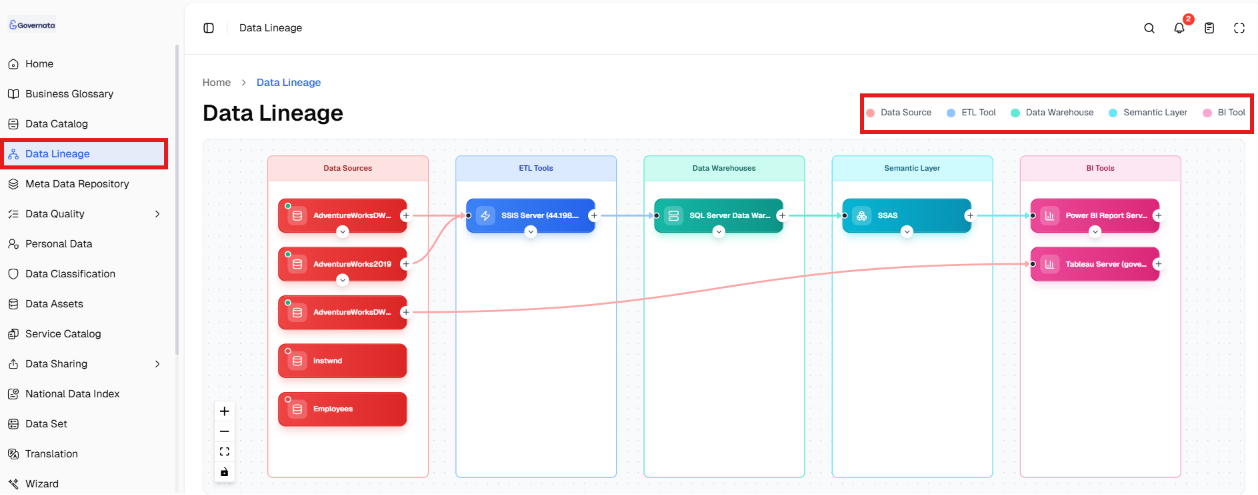
The interface includes:
- Data sources
- ETL tools
- Data warehouses
- Semantic Layer
- Business Intelligence tools
The relationship between these elements is displayed sequentially to show the flow of data from source to reports.
9. Exploring Data LineageViewing the Data Path
To view the data path:
- Open the data element from the Data Catalog.
- Navigate to the Data Lineage tab.
- Browse the path from source to final use.
Analyzing Operations and Transformations
The user can:
- Know the operations performed on data
- Understand how values are derived
- Identify change points within the path
Impact Analysis
Data lineage can be used to determine:
- Systems affected when a data element is modified
- Reports that depend on the data
- The extent of the change impact on the organization
The ability to access data lineage depends on the permissions granted to the user.
The user may be able to:
- View the data path
- Analyze relationships between elements
Some data may also be restricted based on:
- Data classification
- Sensitivity level
- Source access permissions
Scenario 1: Identifying the Source of a Number in a Report
Situation
A user wants to know the source of a specific number within a report.
Steps
- Search for the data element within the Data Catalog.
- Open the element details.
- Navigate to the Data Lineage tab.
- Review the data source and transformations.
Outcome
The source of the number is identified and how it was calculated is understood.
Scenario 2: Analyzing the Impact of Editing a Data Element
Situation
A data engineer wants to know the impact of modifying a data element.
Steps
- Open the data element.
- Navigate to Data Lineage.
- Review related systems.
- Analyze impact points.
Outcome
Systems and reports affected by the change are identified.
12. Best PracticesTo get the most out of data lineage, the following is recommended:
- Review data lineage before using any data
- Use impact analysis before making any modifications
- Always verify the data source
- Rely on data lineage to understand data flow between systems
What is the purpose of the Data Lineage module?
It aims to trace the data path and understand how it moves between different systems.
When do I use data lineage?
When you need to know the source of data or understand the operations performed on it.
What is the difference between data lineage and structure?
Structure shows the data architecture, while data lineage shows its path and flow.