
The Data Quality module in Governata is one of the core modules aimed at measuring and improving data quality within the organization.
This module enables continuous monitoring of data quality through clear indicators, tracking issues, and applying quality rules to ensure data accuracy, completeness, and consistency.
The module helps to:
- Measure data quality using clear indicators
- Discover problems in data
- Track and address data quality issues
- Apply data quality rules
- Improve data reliability within the organization
The Data Quality module aims to ensure that data used within the organization is:
- Accurate
- Complete
- Consistent
- Up to date
This supports decision-making based on reliable data.
3. Scope of the Data Quality ModuleThis manual covers the use of the Data Quality module, including:
- Data Quality overview dashboard
- Data quality issue tracking
- Data quality rule management
- Quality indicator analysis
Data Quality
The degree of accuracy, completeness, and consistency of data within the system.
Data Quality Rules
A set of rules applied to verify the validity of data.
Data Issues
Errors, incorrect values, or missing data in the dataset.
Data Quality Tracking
The process of monitoring issues and resolving them.
5. Roles and ResponsibilitiesSeveral roles share responsibility for managing data quality:
Data Stewards
Responsible for monitoring data quality and resolving issues.
Data Analysts
Use quality indicators to evaluate data before using it.
Governance Teams
Set policies and monitor compliance with data quality standards.
Technical Teams
Support the implementation of rules and technical improvement of data quality.
6. Target Audience- Data Stewards
- Data Analysts
- Governance Teams
- IT Teams
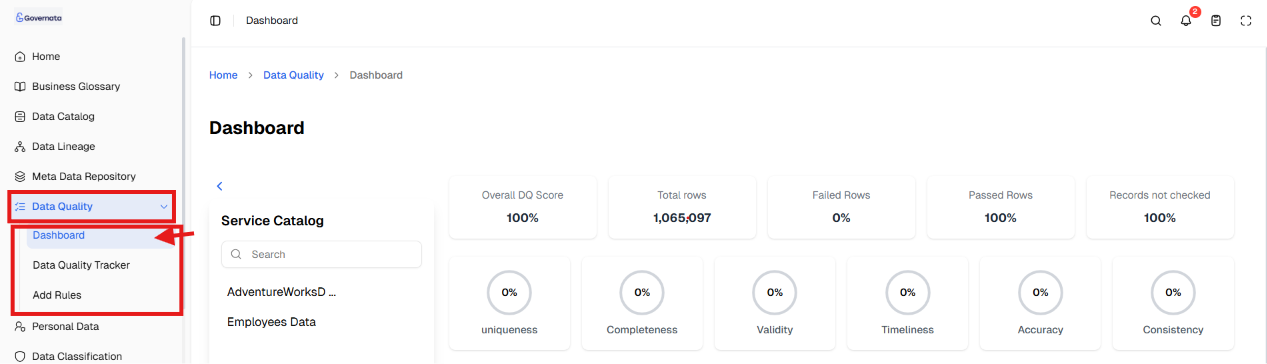
To start using the Data Quality module:
- Navigate to the side menu.
- Select Data Quality.
- Select one of the sections:
- Overview
- Data Quality Tracking
- Data Quality Rules
As shown in Figure (1).
[Figure (1)]
First: Overview
The Overview page displays comprehensive indicators about data quality within the system.
As shown in Figure (2).
[Figure (2)]
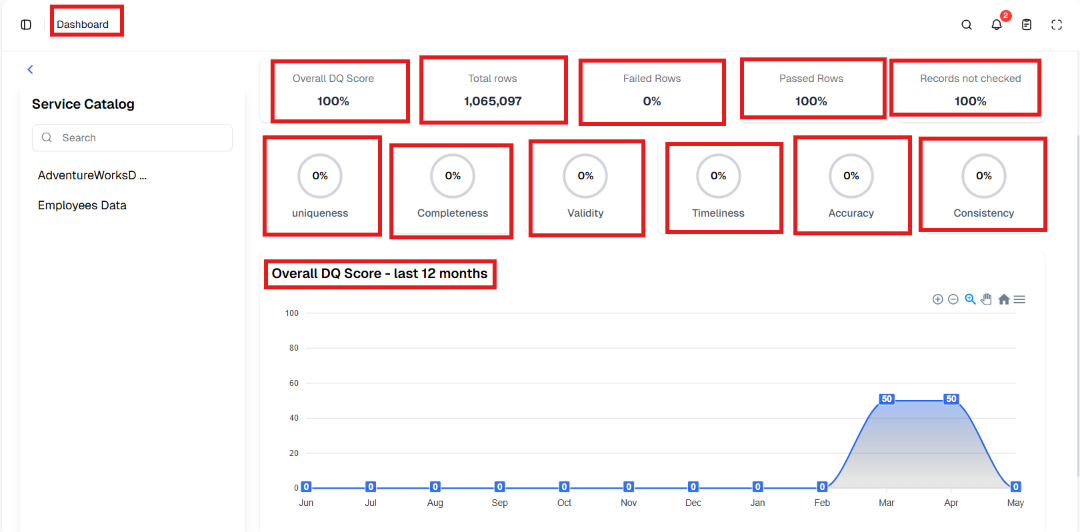
Includes:
- Total rows
- Valid rows
- Invalid rows
- Overall quality percentage
Quality indicators are also displayed such as:
- Consistency
- Accuracy
- Data timeliness
- Validity
- Completeness
- Data uniqueness
|
📌 Tip These indicators help evaluate data quality quickly. |
Second: Data Quality Tracking
This section is used to monitor and manage data quality issues.
As shown in Figure (3).
[Figure (3)]
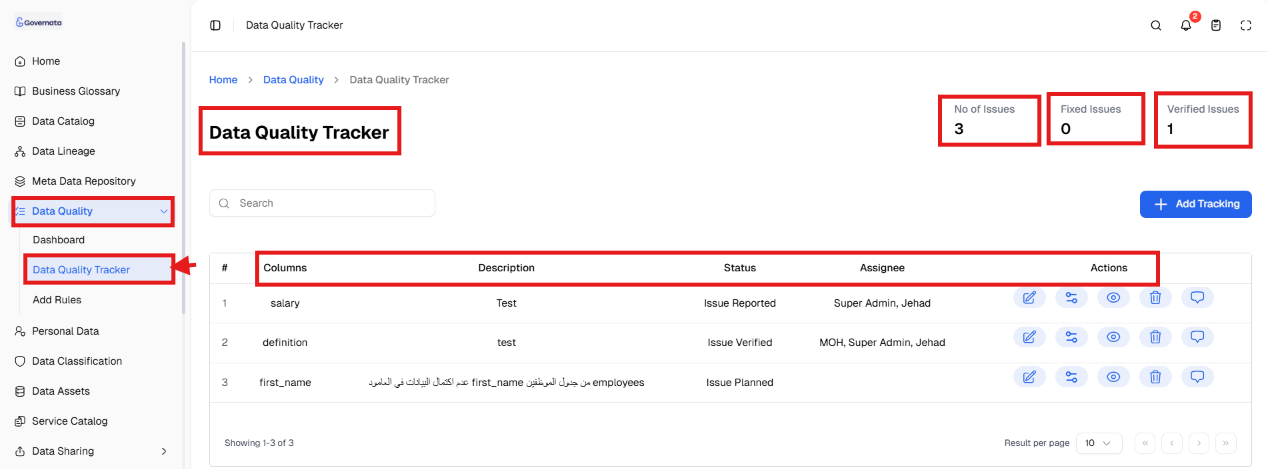
It displays:
- Number of issues
- Verified issues
- Resolved issues
It also contains a table including:
- Affected fields
- Issue description
- Status
- Person assigned for resolution
Third: Adding a Tracker
The Add Tracker feature is used to register a new data quality issue for monitoring and resolution.
As shown in Figure (4).
[Figure (4)]
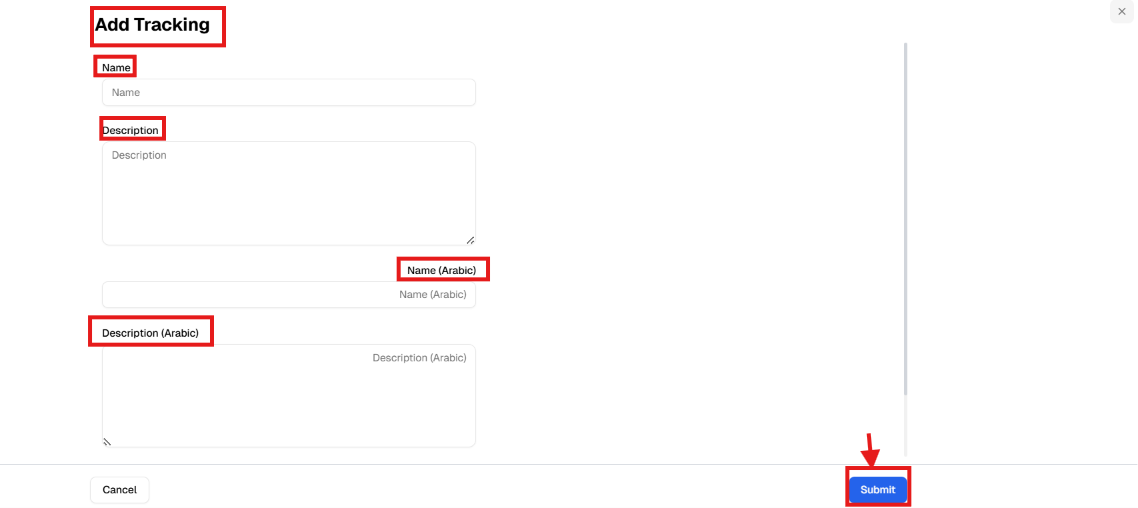
Steps:
- Navigate to Data Quality Tracking.
- Click Add Tracker +.
- Enter: (a) Name, (b) Description.
- Click Submit.
Outcome:
The issue is registered and appears in the tracking list for follow-up.
Fourth: Data Quality Rules
This section allows management of data quality rules.
As shown in Figure (5).
[Figure (5)]
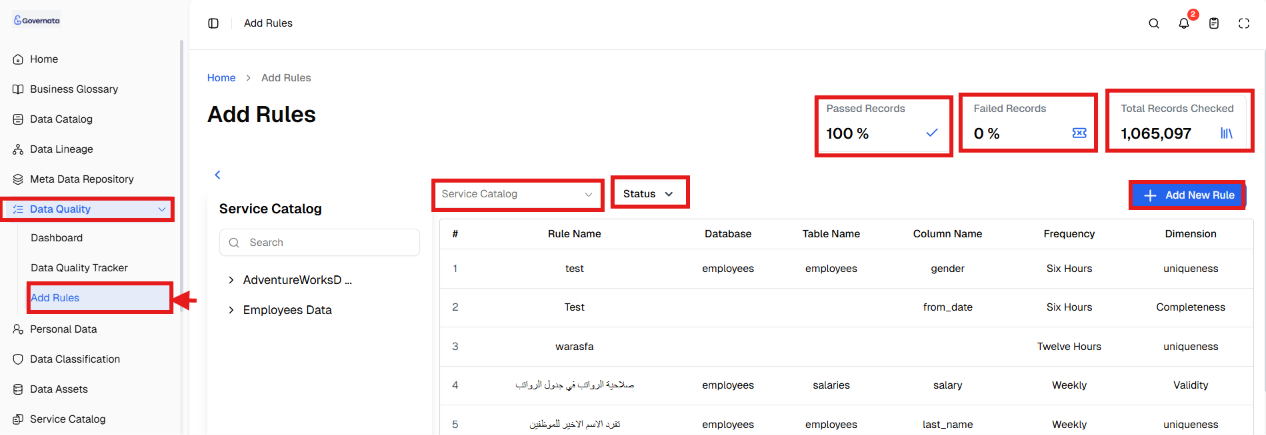
Displays:
- Total records examined
- Successful records
- Failed records
Also contains a table showing:
- Rule name
- Table name
- Database
- Rule status
Monitoring Data Quality
The user can:
- Review quality indicators
- Determine data quality level
- Analyze performance over time
Issue Tracking
Steps:
- Navigate to Data Quality Tracking.
- Review the list of issues.
- Select the issue.
- Monitor its status or update it.
Managing Quality Rules
Steps:
- Navigate to Data Quality Rules.
- Review existing rules.
- Analyze examination results.
- Edit or improve rules as needed.
- Permissions
Permissions depend on the user role within the system.
May include:
- View quality indicators
- Manage issues
- Create or edit quality rules
Access may also be restricted based on:
- Data type
- Data classification
- Sensitivity level
Scenario 1: Discovering a Data Issue
Situation
A user noticed a drop in data quality.
Steps
- Enter Overview.
- Review indicators.
- Navigate to Data Quality Tracking.
- Identify the issue.
Outcome
The cause of the issue is discovered and resolution begins.
Scenario 2: Tracking a Data Quality Issue
Situation
A Data Steward wants to follow up on an issue.
Steps
- Enter Data Quality Tracking.
- Search for the issue.
- Review its status.
- Update the status.
Outcome
The issue is tracked until resolved.
Scenario 3: Analyzing Quality Rule Results
Situation
A user wants to evaluate data quality.
Steps
- Enter Data Quality Rules.
- Review success and failure rates.
- Analyze rules.
Outcome
Data quality is evaluated and decisions are made to improve it.
11. Best Practices- Review quality indicators periodically
- Address issues as soon as they are discovered
- Apply clear quality rules
- Assign a responsible person to each issue
- Use quality indicators before making decisions
What is the purpose of the Data Quality module?
To ensure the accuracy, completeness, and consistency of data within the organization.
How do I know that data is incorrect?
Through quality indicators or registered issues.
Can quality rules be edited?
Yes, rules can be edited to improve data quality.